Support

Need Help with BinDay Fife?

Help with address searches, collection dates, reminders, recycling centres, service updates and feedback.

For official council services, missed-bin decisions or urgent waste-service requests, use Fife Council directly.

Best route

Choose the Best Support Route

For most app issues, sending a report from inside BinDay Fife is the easiest place to start.

Use the App If You Can

Send Feedback or Report an Issue inside BinDay Fife. It can include basic app details safely, so you do not have to type everything out.

  • Best for wrong dates, address issues, reminders or app behaviour
  • Designed to keep reports privacy-safe
  • Add an email only if you want a reply

Contact BinDay Fife Support

Email if you cannot use the app, need a reply, or want to explain something in more detail.

Use Fife Council for Waste Services

BinDay Fife can help with app issues, but official council waste-service requests should go to Fife Council.

  • Missed-bin decisions and collection service requests
  • Urgent waste-service problems
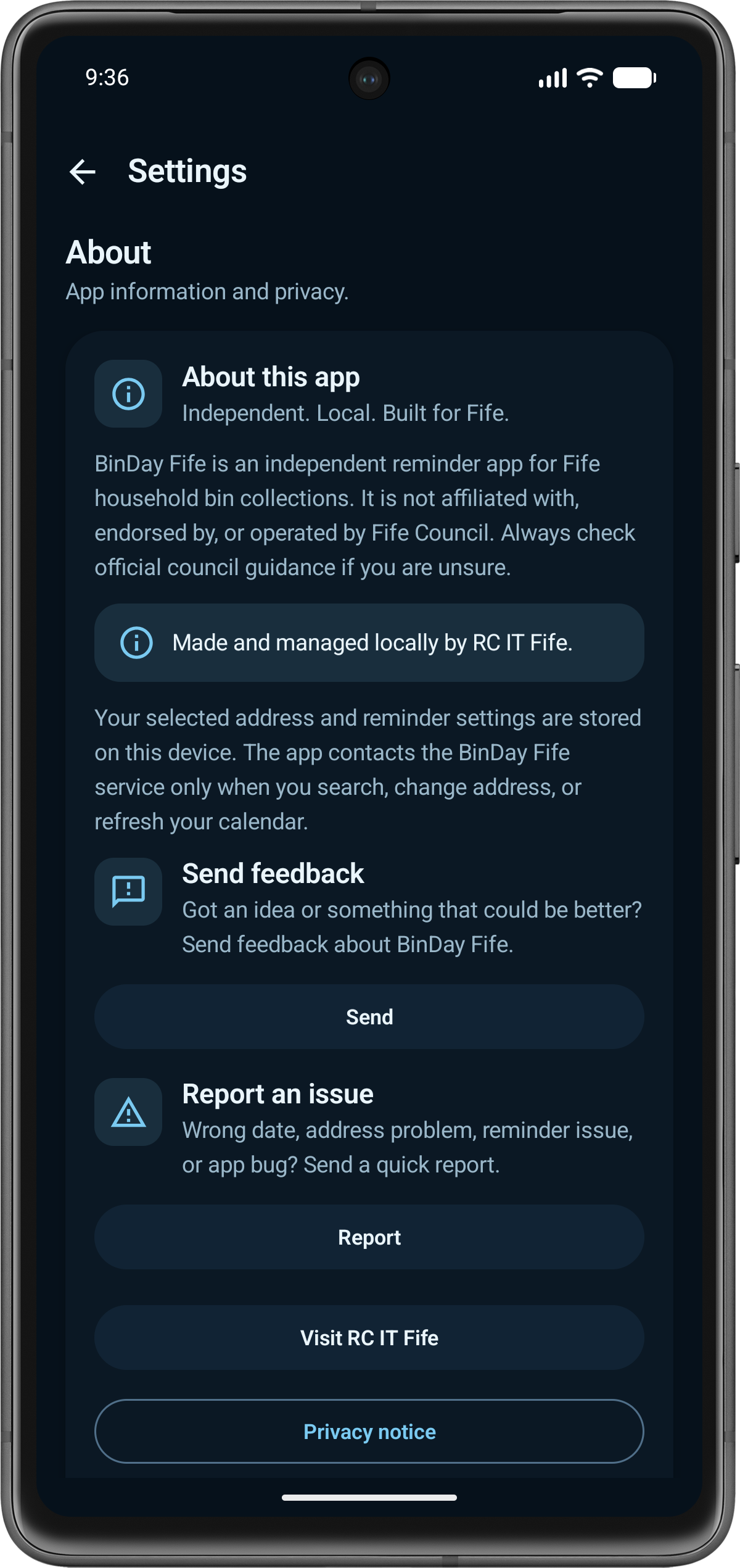
BinDay Fife settings screen showing Send Feedback and Report an Issue options.
Find Send Feedback and Report an Issue in the app settings.

Common questions

Quick Help for Common Issues

A few common issues and the quickest next step for each one.

Address Not Found

Search again with the postcode first. If your Fife address still does not appear, report it from the app or email support.

Wrong Collection Data

Refresh your calendar in the app first. If it still looks wrong, tell us what the app shows and what you expected.

Reminders Not Showing

Check Notifications & Reminders, make sure notifications are allowed, then use the test notification option.

Recycling Centre Information

Include the centre name and what seems out of date. If you need an official answer before travelling, check Fife Council directly.

Feedback and Reports

Use Send Feedback or Report an Issue inside the app where possible. It helps include useful app context safely.

Service Updates

If a notice is unclear, missing or no longer relevant, include the notice title or affected area shown in the app.

What to include

Tell Us What Happened

Say what happened, what you expected, and whether it relates to collections, reminders, recycling centres, service updates or general app behaviour.

Screen or Action

Which screen you were using, or what you tapped before the problem happened.

What the App Showed

The date, message, centre or update that looked wrong or unclear.

What You Expected

What you thought should have appeared instead.

App and Device Details

App version, device model and Android or iOS/iPadOS version if you know them.

Send safely

Keep It Practical

Please avoid personal details unless they are needed to understand the issue.

Need a reply?

Use Email When Needed

Add an email address to your in-app report, or contact directly if you need a response.